
KeyRunner — turn any VS Code API request into a credential-safe AI tool
KeyRunner (`KeyRunner.keyrunner` v1.0.97) is a local-first VS Code API client supporting HTTP/REST, GraphQL, gRPC, WebSocket, and Kafka — with an AI Tool Converter that wraps any saved request into a credential-safe, MCP-compatible AI tool so your agent never sees the raw API key.

Most teams reach for Postman or Thunder Client and call it done. The workflow works until it doesn't: Postman's pricing crept up, Thunder Client is VS Code-only with limited free collection runs, and neither has an answer for the new problem — you now want an AI agent to call your APIs, and handing it a raw API key is a production liability waiting to detonate. 1
Extension ID:
KeyRunner.keyrunner · Publisher: Launch I AM Enterprise · Version: v1.0.97 (released 2026-06-02) · License: MIT · Install on VS Code MarketplaceThe problem KeyRunner is built around
The raw-API-key-to-agent pattern breaks in five ways that are invisible in demos but painful in production: 1
- Credential sprawl — the key enters system prompts, environment variables, and agent memory, then gets serialized and logged.
- Over-permissioned access — one key grants everything the API allows; the agent can't be narrowed to just the operations it needs.
- Unfiltered responses — SSNs, health records, and card numbers flow into the model context without redaction.
- Thin audit trail — API logs tell you a call was made; they don't tell you which agent, which session, or what parameters were passed.
- Manual rotation risk — change a credential and you must find and update every agent configuration that references it.
As KeyRunner's official documentation puts it: "Most teams start with the same pattern: give the AI agent an API key, wire it into a tool, and let it call enterprise APIs directly. It works in demos. It fails in production." 1
What KeyRunner is
KeyRunner is a local-first VS Code API client — HTTP/REST, GraphQL, gRPC, WebSocket, and Kafka (added in v1.0.94) all run inside your own environment, with no data leaving your machine. 2 At its core it does what Postman and Thunder Client do: Collections, Environments, Scripts, Mock Servers, and scriptless testing. The difference is in what it layers on top: a secret scanner, vault integrations to five providers, and the AI Tool Converter.
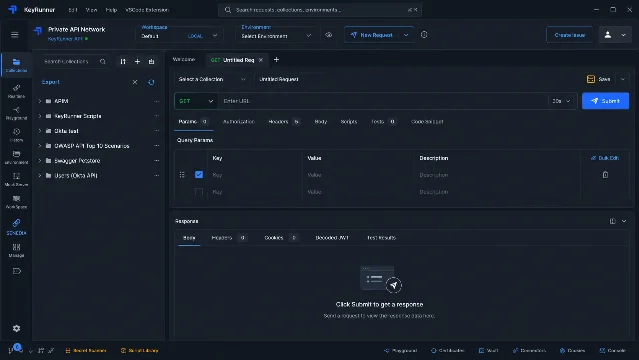
The free tier (Local-Lite) is worth calling out: unlimited Collections, unlimited Mock Servers, all five vault integrations, and CLI access — no credit card required. 3 Postman's free plan caps at 25 requests per collection. Bruno is fully open-source but has no managed team collaboration. Thunder Client's free tier limits collection runs.
Today's tip: the AI Tool Converter
The AI Tool Converter converts any existing API request into a named, policy-gated, MCP-compatible (Model Context Protocol) tool that an AI agent can call — without the agent ever seeing a credential. 2
How to use it:
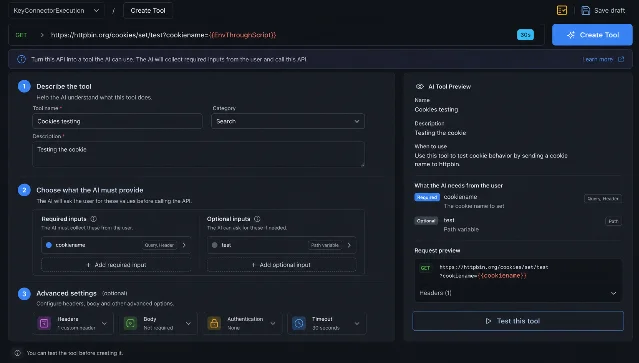
Step 1 — Open any saved request in your Collection. Right-click the request → "Convert to AI Tool" (or use the toolbar button). The AI Tool Converter panel opens alongside the request.
Step 2 — Describe the tool. Give it a name (
get-customer-by-id), a category, and a one-sentence description of what it does. The right panel shows a live AI Tool Preview as you type.Step 3 — Define required and optional inputs. KeyRunner auto-detects URL parameters, query params, and headers from the existing request and surfaces them as required or optional inputs. For each input you specify whether it maps to a query parameter, path variable, or header. The agent will collect these values from the user before executing.
Step 4 — Bind credentials at runtime. In the Authentication section, leave the field blank — instead, connect it to your vault (HashiCorp Vault, AWS Secrets Manager, Azure Key Vault, GCP Secret Manager, or 1Password). At execution time, KeyRunner resolves the secret from the vault and injects it into the API call. The agent never receives the value. 4
Step 5 — Save and expose via KeyRunner MCP. The tool becomes available to any MCP-compatible AI coding assistant — GitHub Copilot, Cursor, Claude Code — through the KeyRunner MCP server.
The security model KeyRunner runs behind the scenes is a six-step pipeline: API Catalog → Tool Registry → Policy Check → Credential Runtime → API Action → Audit. Policy is evaluated before credentials are retrieved — requests that violate agent role, scope, or rate limits are blocked before execution, not flagged after the fact. 4 Every tool call produces an immutable audit record: agent identity, tool invoked, parameters passed, policy decision, and result. Those logs export to Splunk, Datadog, and OpenTelemetry. 4
Vault connections in practice
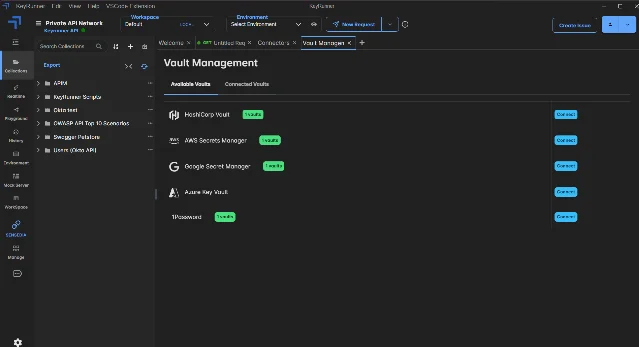
The Vault Management panel (accessible from the bottom toolbar in VS Code) lists all five providers: HashiCorp Vault, AWS Secrets Manager, Google Secret Manager, Azure Key Vault, and 1Password. Connecting a vault requires only the endpoint and access token — from that point, any request in any Collection can reference a secret by name rather than by value. 2
Compatibility and adoption signals
| Extension ID | KeyRunner.keyrunner |
| Current version | v1.0.97 (2026-06-02) |
| Protocol support | HTTP/REST, GraphQL, gRPC, WebSocket, Kafka |
| Auth methods | Basic, Bearer, OAuth 2.0, API Key, NTLM, mTLS |
| Vault integrations | HashiCorp Vault, AWS Secrets Manager, Azure Key Vault, GCP Secret Manager, 1Password |
| Compliance certifications | SOC 2 Type II, HIPAA, GDPR (self-reported) |
| Desktop app | Windows (.exe), macOS Intel/Silicon (.dmg) |
| CLI | npm install -g keyrunner |
| Linux | VS Code extension and CLI only; no native desktop client |
| GitHub | 21 stars, 25 releases, MIT, VAPT completed Sep 2025 |
| AI Tools Add-on | Requires Explorer plan ($49/user/month); add-on is custom-priced |
All data sourced from the VS Code Marketplace listing, 2 the GitHub repository, 5 and the pricing page. 3
A note on community maturity: 21 GitHub stars and no Hacker News discussion reflects a product launched in October 2024, not one with a proven track record. Independent third-party reviews are scarce. The SOC 2 Type II and HIPAA compliance badges on the Marketplace page are self-reported — no public audit report is available for download. 3 The VAPT (vulnerability assessment and penetration test) completed in September 2025 is the only publicly documented external security check. 5
The free tier makes the evaluation cost zero. If your team's main pain point is Postman's pricing or keeping API credentials out of AI agent context, KeyRunner is worth an hour to evaluate on a non-critical project before committing to the Explorer plan.
Cover image: AI-generated illustration.
Add more perspectives or context around this Post.